Lid closed, work stopped
Local agents live and die with your laptop. Close it, lose Wi-Fi or let it sleep and the fleet stops — mid-run, with the work half done.

The full InfiniBot agent OS on your own private cloud machine. Sign in, bring your AI keys, and a fleet of agents — Claude Code, Codex, OpenCode, Gemini — goes to work. Nothing to install.
Flat from $19/mo · AI usage bills to your own provider · Free to self-host
The whole OS in a browser tab — desktop, tablet or phone.
An isolated cloud machine per workspace. Never a shared seat.
Sleeps when idle on Starter, or stays on 24/7 from Pro up.
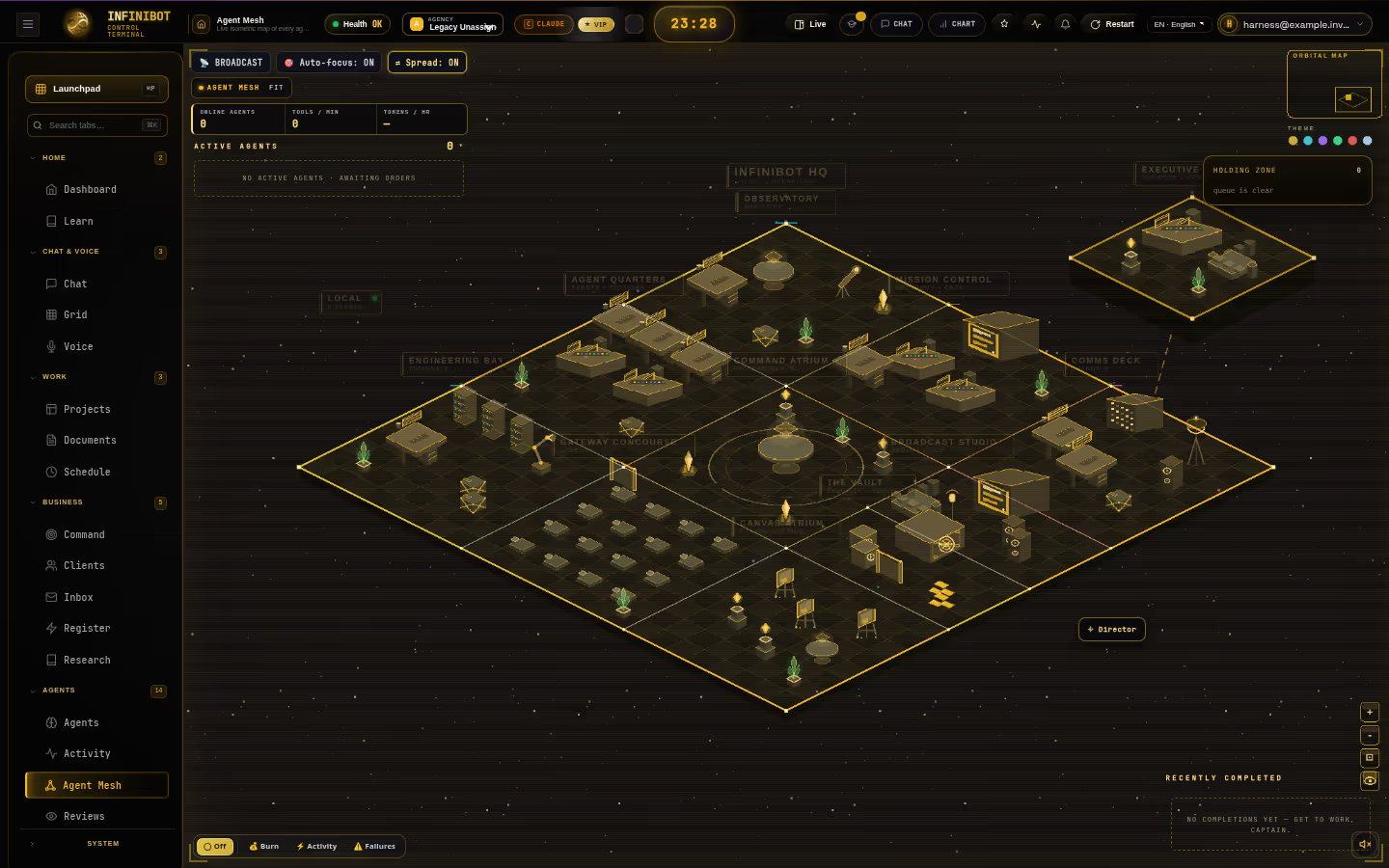
This is the real InfiniBot agent mesh: coder agents fanning out across a repo audit, each walking to its room on the map as it works. In the cloud, the same mesh runs on your private machine — open a tab and it's there.
Local agents are powerful right up until the lid closes. Then the fleet stops, the bots go quiet and tonight's work waits for morning.
Local agents live and die with your laptop. Close it, lose Wi-Fi or let it sleep and the fleet stops — mid-run, with the work half done.
Runtimes, CLIs, ports, tunnels and a gateway to babysit before the first agent runs. Then do it again on the next machine.
API keys copied into config files on every device you own. Nothing encrypted, nothing in one place, no idea which key an agent used.
Reaching your agents from a phone means VPNs and port forwarding. Most people just don't — so the work waits for the desk.
The fixInfiniBot Cloud moves the whole OS onto a private machine that is always one tab away — from any device.
Every workspace gets its own isolated cloud machine with its own storage and gateway — not a seat on a shared chatbot. It sleeps when you are idle and wakes in seconds when you come back.
Its own processes, storage and gateway. Your agents, files and memory never share a runtime with anyone else.
Starter wakes when you open the app and sleeps when you leave. Pro, Business and Scale stay on 24/7, so agents keep working while you're away.
Not a lite edition. It's the full InfiniBot you can run yourself, with state kept on the machine's own volume.
Install Claude Code, Codex, OpenCode or Gemini CLI from Setup › Coders in one click, sign in, and each becomes a backend the orchestrator can hand work to.
Deepest reasoning — long-context planning and careful, reviewable edits.
claude_coderFast coding bursts — rapid, high-throughput implementation passes.
codex_coderOpen and provider-agnostic — route it to whichever model you bring.
opencode_coderGoogle's open-source terminal agent, as another backend for sub-agents.
geminiCoders install onto your cloud machine, not your laptop. Sign in once and every sub-agent that needs that backend can use it.

17 model providers. Each key is checked with the provider when you add it, then encrypted.
Hand the orchestrator a goal. It splits the work, spawns sub-agents with non-overlapping scopes, and checks each result before calling it done.
› splitting the launch checklist into scopes
› restyling the pricing cards
› fixing the failing auth tests
› screenshotting every page at 390px
› comparing three payment providers
› drafting the API reference
› logging new leads to the pipeline
› sending you the daily report
Illustration of a run — your agents, tasks and counts will differ. Parallel agents scale with your plan.
Research, build, audit and ship run side by side instead of waiting in one chat thread.
Runs finish with evidence — commands, tests, screenshots — and get reviewed before they count as done.
Message any running agent, stop it, or respawn it with its progress so far. You stay in charge.
Agents appear on a live isometric map, walk to the room that matches their work and report back when they finish. Click one to open its chat panel right on top of the map.

Captured from a fresh InfiniBot Cloud workspace.
Say what you want done. The orchestrator picks the right agents and fans out to coders, native tools and MCP servers — in parallel, plus the agent browser and your channels.
Add any MCP server and its tools become available to every agent you allow.
Talk to it like a colleague. It turns a spoken sentence into routed, scoped work — and tells you when it's done.
No tab, no form, no typing. Push-to-talk and the orchestrator takes it from there.
Heavy work fans out to background agents at once, each on its own scope.
The line stays open while agents run, and each result is read back as it lands.
Voice runs on Robovoice, linked to your workspace.
“Ship the landing tweaks and run the tests.”
“Done. Landing shipped and the tests are green.”
Connect a Telegram bot, WhatsApp or Slack and talk to your workspace from anywhere. On always-on plans they answer at 3 a.m.; on Starter they wake with you.


Chat with the orchestrator, get reports and approve actions with one tap.
Link your number and message your workspace like any other contact.
Bring agents into the channels your team already works in.
Deletes, spends and other gated tool calls wait in the approvals inbox in the app — and the same card lands on your Telegram. Only the workspace owner can approve.

Ask where something is and it doesn't describe a menu — it opens the page and highlights the exact control, step by step. It knows its own pages, settings and plugins, so setup becomes a conversation.


Everything below ships in every cloud plan. Each screen is a real capture of InfiniBot.
Projects, tasks and a kanban board live inside the OS. Agents file their own cards, move them as they work and leave notes you can read back.

Projects, clients, notes, tasks and research become one navigable graph, so agents and you can follow the thread from any node.

What one agent learns, the next one knows. Memory is shared across the whole fleet and lives on your machine's own volume.

A rich document editor with categories, tags and project links. Agents draft specs, reports and plans straight into it.

Save a multi-step process once and run it on demand or on a schedule. On always-on plans they fire while you sleep.

A live feed of sub-agents spawning, tools being called and runs finishing, with the brief and transcript one click away.

Kanban, notes, memory, research, workflows, browser and more are native tools. Add MCP servers and skills on top.

Give agents roles, models and tools, arrange them in a hierarchy and let the lead agent triage and delegate to the rest.

The plugin catalog adds first-party apps with their own pages, agents and data. Turn on what you need; everything else stays off.
Holder bubble maps, convergence boards, AI analysis and alerts — with agent access you control, from read-only to full, and a kill switch.

Executive view, daily operations, an AI workforce with roles and shifts, approvals, reviews and an agency topology — driven by an operating loop you authorise.

Browse, enable and disable plugins from the catalog. Each one declares its own pages, tools and permissions, so you know what it can do before you switch it on.

Pick a plan and your private machine is provisioned for you. Bring a key and put the fleet to work.
Hosted doesn't have to mean shared. The cloud is built so your workspace stays yours.
Your own processes, storage and gateway. No shared runtime, no pooled memory with other customers.
Checked with the provider when you add them, encrypted with AES-256-GCM, shown only masked.
Gated actions wait for the workspace owner in the app's approvals inbox or on Telegram. Agents can't approve themselves.
Sign-in stands in front of every workspace, and the app looks your machine up at runtime — no machine address is baked into the page.
Model calls run on your own key from your workspace, billed by your provider. We never resell or mark up tokens.
The same OS is open source under AGPL-3.0. Move to self-host whenever you like.
No installer, no server, no terminal setup. Minutes, not an afternoon.
Create your account in a few seconds. Nothing to download.
Starter to Scale, billed monthly through Whop. Your private machine is provisioned for you.
Add a model key or two — InfiniBot highlights exactly where.
Type or talk, or message it on Telegram. The fleet takes it from there.
Plans differ in machine size and uptime — never in features.
Claude Code, Codex, OpenCode and Gemini CLI in real terminals, several at once.
Every agent, room and status in one view.
Telegram, WhatsApp and Slack.
Push-to-talk delegation with spoken results.
One brain shared by every agent, on your machine's own volume.
Business & Agency, Discipline, Products, Canvas Library, Whiteboard, Robovoice.
A real browser your agents drive.
Owner-only, in the app and on Telegram.
InfiniBot highlights where to click.
InfiniBot is open-core. Run it yourself for free, or let us run it for you on a private machine.
| InfiniBot Cloud | Self-host | |
|---|---|---|
| Install | Nothing — open the app | Install on each machine you own |
| Where it runs | A private cloud machine per workspace | Your own hardware |
| When your computer is off | Keeps running on Pro and up; Starter wakes on use | Stops with your machine |
| Reach it from a phone | Any browser, plus Telegram, WhatsApp, Slack | Your own tunnel or VPN |
| Updates | Managed for you | You update |
| Local models (Ollama) | Cloud providers on your keys | Yes, on your GPU |
| Price | $19–$199 per month, flat | Free under AGPL-3.0 |
Pick a machine size and whether it stays on. AI usage goes straight to your own provider, so the plan is the whole bill from us.
Best for Hands-on solo sessions
Every OS feature included
Get StarterBest for Solo operators who want 24/7 agents
Every OS feature included
Get ProBest for Agencies and small teams
Every OS feature included
Get BusinessBest for Teams running a fleet all day
Priority support
Get ScaleEvery plan includes the full OS: coders, mesh map, chat, memory, plugins, MCP and terminals, plus voice, channels, scheduled jobs and the agent browser. BYOK — AI usage is billed by your own provider.
Flat and BYOK instead of ACUs and credits, the widest scope in one system, and open-core you can leave with.
InfiniBot Cloud is the full InfiniBot agent operating system running on your own private cloud machine. You get parallel coding agents (Claude Code, Codex, OpenCode and Gemini CLI), a live agent mesh map, chat, projects, memory and a knowledge graph, and plugins — in the browser, with nothing to install. Voice and Telegram, WhatsApp and Slack channels are included too.
No. Sign in at the app and your workspace runs on a cloud machine we host for you. Coding agents like Claude Code are installed onto that machine from Setup › Coders with one click.
No. Every workspace runs on its own isolated cloud machine with its own storage and gateway. Nothing is pooled with other workspaces.
A sleeping machine resumes in seconds when you open the app. On Starter it sleeps when you are idle; on Pro, Business and Scale it stays on 24/7, so there is nothing to wake.
Yes. InfiniBot is bring-your-own-key. Add keys for providers like Anthropic, OpenAI, Google Gemini, OpenRouter or Groq and they bill you directly at their price. InfiniBot charges only the flat plan price and never marks up tokens.
Each key is checked with its provider when you add it, then encrypted at rest with AES-256-GCM and only ever shown masked. Model calls are made on your key from your workspace.
Only the workspace owner. Actions that need a sign-off wait in the approvals inbox in the app, where the owner approves or denies them. The same approval card is sent to your Telegram so you can decide from your phone.
Self-host is free under AGPL-3.0 and runs on your own hardware, including local models. Cloud runs the same OS on a private machine we manage, reachable from any browser, with always-on plans that keep your agents running while your computer is off.
Starter: 4 parallel agents · 1 coding at once; Pro: 8 parallel agents · 2 coding at once; Business: 16 parallel agents · 4 coding at once; Scale: 24 parallel agents · 12 coding at once. Coding agents like Claude Code are full CLI processes and use far more memory than a native agent, so they have their own, lower cap. More parallel agents means a bigger plan.
Yes. Plans are monthly and billed through Whop. Upgrade, downgrade or cancel at any time.
Sign in, bring your keys, and your private agent OS is ready in minutes. Nothing to install.